Wednesday, January 26, 2011

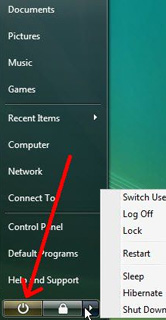
What To Do If Your Windows XP, Vista or 7 Operating System Is Not Shutting Down Properly

Is your Windows operating system hanging up when you try to shut it down? Are you forced sometimes to hold the power button to force it to shut down?
This is something that can happen after a virus update, after a new software install, or for no reason at all.

The first thing you will want to do is run your anti-virus software to check for a malware infection. If no infection is found, then the next step is to determine which software program on your computer is causing the hangup.

While there is no quick fix that guarantees you will find the faulty program on your own, one option you have is to review the programs that are set to auto-start when you turn your computer on. Here's what to do:
  1. Click the START button and type msconfig into your search box.
  2. Click the START-UP tab. This tab will show you all the programs that are set to auto-start with your computer.
  3. Go through the list of programs with a checkmark and uncheck the ones that you know for sure do not need to startup with your computer (e.g. - AIM, Quicktime, etc.).
  4. After you have made your changes, save them and restart the computer.
  5. After you restart your computer, you can always go back through steps 1.-3. and CHECK the box next to programs you WANT to startup, in case you need them.
CAUTION: Changing your startup configuration can negatively impact your computer's functionality if you deselect a critical process that is needed to run. Only make changes that you are 100% certain about. 

You are welcome to call us (847-348-3489) if you are not sure and we will be happy to assist you.  We can even connect in remotely and you can learn as you watch us make the changes.  For more info on this service, check out our website at www.HelpMeMax.com and download CrossLoop.


Tuesday, January 25, 2011

Can my PC run Windows 7?

Can my PC run Windows 7? Microsoft Windows 7 Home Premium UPGRADE DVD

If you scroll down that page, you will see
a large BLUE Button with white lettering to
[ Download the Windows 7 Upgrade Advisor ]
Click that button to go to the page for the actual [ Download ] Button. When Downloading, save the file to the Desktop, so you can find it easily.

In general, if your PC can run Windows Vista, it can run Windows 7. But if you're not running Windows Vista, or are just not sure if your system is ready to run Windows 7, there's a quick way to do a simple check. (Most systems purchased since September 2009 will be compatible, if you have enough RAM and Disk Space available).

Just download, install, and run the Windows 7 Upgrade Advisor... You'll get a report telling you if your PC can run Windows 7 and if there are any known compatibility issues. If an issue can be resolved, you'll get suggestions for next steps. For example, it may let you know that you need an updated driver for your printer and where to get it.

Before you begin
Before you run the Windows 7 Upgrade Advisor, be sure to plug in any USB devices or other devices such as printers, external hard drives, or scanners that are regularly used with the PC you're evaluating.

Download the Windows 7 Upgrade  Advisor Beta
To run the Advisor, follow the install prompts, the LAUNCH the Advisor program and let’ er run…
Find out with the Windows Upgrade Advisor

After you’re finished and satisfied with the results, you might want to head over to the following page to learn more about the Upgrade Process, with some good tips on how to keep things running smoothly:
http://windows.microsoft.com/en-us/windows7/help/upgrading-from-windows-xp-to-windows-7

On the right side of that page are some links to other helpful resources.

What if I don't want to do it myself?
If the whole process seems to “daunting” for you, we can schedule a time to have MAX Communications come in and run it through the upgrade process.

Let us know if you have any other questions…Or just call 847-348-3489 - we're happy to help!

Thursday, December 16, 2010

What is a QR Code?

qrcode

You may have noticed these square blocks showing up in some places on print media and wondered what was going on.  This is known as a QR Code, short for "Quick Response" code.  It is a 2D version of a Bar Code, and can contain much more information. 

Originally developed for use with Inventory Control, this little square can contain Hyperlinks (such as the one on the left) that can be used in Print Media. 

You may be asking yourself..."Why is this useful?".  Imagine having a business card with a QR Code, or a Name tag, or a banner (or even a Billboard).  The opportunity for passersby to simply click with their smartphone and collect and store your information for later retrieval is astonishing, to say the least.  A smartphone user can click the above QR code and be launched to my website.  I could also create a QR Code for my YouTube Channel, or even this blog.

You can create your own QR codes for use in print media and other areas (such as mobile coupons) at a number of sites, including http://qrcode.kaywa.com/.

Check out the following article for more examples: http://searchengineland.com/what-is-a-qr-code-and-why-do-you-need-one-27588

There are also colorful alternatives coming onto the scene that you may find of interest.  For instance, Microsoft is developing a color version that allows for even more data capacity, and has some eye-appealing presentations.  To get a look at some of these, check out the article here: http://searchengineland.com/microsoft-tags-a-compelling-alternative-to-qr-code-hyperlinks-52315

Print-based Hyperlinks - who woulda thunk?!   The web is being integrated into our mobile lives and our lives are being intertwined with new ways of presenting information in a simple, yet powerful, format.

Can you foresee a day when you walk into an art gallery, click on a HCCB, and be able to watch the full time-lapse video of the history of a piece of artwork?  Or click on a QR code at a billboard and be launched to a live webcam feed?  Some interesting possiblities... wouldn't you agree?

Monday, December 13, 2010

Stack Overflow at line 0 on iGoogle

Yes - this has been confirmed to be a problem with a particular "gadget" and is caused by a Javascript error in that gadget. On Friday, December 10, the problem occured with the "TVGuide" gadget, but it has also appeared with other gadgets in the past.

When you experience this issue, you may find that Google Chrome or Firefox (alternative web browers) do not have a problem. It seems to be mainly an issue with Internet Explorer (all versions) and the way that IE executes the Javascript code. Most likely, there is a conflict with some of the "toolbars" that you have installed with IE.

You can continue using IE for your iGoogle page, but you'll just need to use an alterntive browser to login to your account and remove the offending "gadget". You will probably find that you can add the gadget again after a couple of days, and all will be well.

- Jim K - www.HelpMeMax.com

Wednesday, December 1, 2010

What Exactly is Cloud Computing and How Can it Benefit My Business?

Business Computing Tip-of-the-Month:  

One of the most hyped technology trends this year is cloud computing, and it is for good reason. Cloud computing services can save businesses tens of thousands of dollars a year and make them more efficient. With cloud computing, small businesses reap the benefits of not having to deploy costly physical infrastructures like file and e-mail servers, storage systems or shrink-wrapped software. Plus, employees and business partners can now enjoy hassle-free collaboration with cloud computing's "anywhere, anytime" availability.

So what exactly is cloud computing?

Let's take a quick snapshot look of what constitutes a true cloud-computing solution.
  1. Cloud-computing services require no software to purchase or install. This does not include lightweight applets or a Java plug-in required to use the service.

  2. Cloud-computing fees are typically subscription-based. You can often choose between month-to-month and year-to-year.

  3. Another popular feature of cloud computing is that it is easily scalable. Many solutions can work for companies with 5 employees or 5,000. Cloud services are nimble because they generally grow as your business grows.
If you are interested in exploring cloud-based solutions for your business, we can provide you with an un-biased look at the options that are available to you. Kindly give us a call at 847-348-3489, and we will set-up a time to sit down with you to go over these solutions.


10 Tips for Safe Online Holiday Shopping

Home Computing Tip-of-the-Month:  

Now that the holiday season is in full swing, it's important to implement safe buying practices when you are shopping online. Today's technology creates an environment for ultra-safe shopping; however, there are a few scams to be aware of that could cost you in the end. We've put together our list of the top 10 tips for safe online shopping.
  1. Arm your computer — Make sure your computer has the most recent updates for spam filters, virus software, and malware removal programs.

  2. Shop on trusted websites — The first place to start is to check the seller's reputation. Look for the BBB seal and other signs of credibility, such as ratings online, SSL encryption, and a money-back guarantee.

  3. Protect your personal information — The BBB recommends that you take the time to read the website's privacy policy and understand what personal information is being requested from you. If there is no privacy policy found, that should be a red flag to you.

  4. Beware of deals that sound too good to be true — If an offer on a website or through an email sent to you sounds too good to be true, it usually is. Beware of false advertisements and deals that no other website seems to be even close to offering. In the end, consumers who fall victim to these scams end up paying the price in identity theft.

  5. Beware of "phishing" schemes — Legitimate businesses will not send you an email asking you to confirm your contact or payment information once your order is placed. PayPal is a big target for these types of scams. We recommend that you call the contact number on the website you ordered from in the event that you receive an email like this.

  6. Look for SSL Encryption — Always check the bottom right corner of your web browser when you are on a page that is asking for any sensitive information. If you do not see a picture of a "lock" then that page is not SSL encrypted and we do not recommend you proceed.

  7. Use your credit card— Federal law has very strict policies in place to protect consumers when they use a credit card to make a purchase. You should never wire money to any business.

  8. Keep a copy of your order documentation — We recommend that you always print the confirmation page that is shown to you after you place your order. You will need this information as proof of your order in the event that the item does not arrive, arrives damaged, or not as described. Your credit card company will request a copy of this receipt to fight on your behalf.

  9. Make it a habit to check your credit card statements often— Log into your credit card and bank accounts each week to check each transaction that posts to your account. This is especially important after you make a purchase online to verify that no un-authorized transactions are posting.

  10. Understand your rights — There is a Federal law in place that requires orders placed by mail, phone or online to be shipped within 30 days of the date of purchase. If the goods are not shipped in time, you are entitled to a full refund. You also have the right to reject merchandise when it arrives. If you accept the merchandise then you are bound by the company's policies that govern the accepted transaction.

Monday, November 22, 2010

How Social Media is Like a Gym Membership

When you join a gym you join with intent: to lose weight, get healthier, tone up for bathing suit weather, etc. If you participate regularly, over time you reach your goal. Just joining the gym won't make you thinner - you need to participate. It's no different with social media. You join with a purpose: to make friends, expand your network, attract clients, etc. But, just putting up a profile doesn't mean you're participating. You need to contribute in a positive way. If you are a member of any gym or social media community you know there are a lot of different people there with different reasons for being there.

Chatty-Cathy: She joins to socialize. Maybe she is an old friend from college or high school. Her contributions are gossipy, trivial and though fun at times, are a complete time-vampire. Don't be overly engaged by her witty remarks. Sometimes, she will jump into your business conversations without knowing that she is making you look bad. Get back on topic (or elliptical) and focus on your goals.

Pushy-Pete: He is only there to sell. Sure he looks casual and might walk around with a weight in his hand, but his pockets always have business cards. Online he always suggests you, "Check this out. It's really awesome," with a link to his product sales page. He has absolutely no interest in you, asks how you're doing without waiting for your answer, and if you engage him he will never let up. Well, not until Facebook shuts him down for spamming or you change the time you workout.

Multitask-Mary: She works out with a book, headphones and her smart phone. She is trying to do it all and is getting nowhere. Online, she connects all her platforms together to form an endless stream of consciousness that most can't follow. You see lots of conversations that have RT @so-in-so, LOL! This is relevant to me how?

80/20 Rule: Whether you are working out or participating in a social community, you need to give 80% of the time. At the gym it means you can chat and socialize 20% of the time, but you better be working out the other 80% or you will not get results. Online you should be engaging others, offering information and building relationships 80% of the time. If you do that, 20% of your participation can warrant invitations to your events or to check out your new offer. If you have it the other way around you will not reach your goal in business or at the gym. And remember, you need to stick to it. There is no way to lose weight or build a solid relationship fast that will last.

Credit for the above goes to Paula Pollock.  Paula Pollock is Director of the Pollock Marketing Group, further assisting good companies in becoming great through outsourced marketing services with her team of professionals. PMG supports business marketing at all levels from DIY, short-term projects and campaign corrections. You can sign up to receive her bi-monthly Bite-Sized Marketing Tips newsletter at www.paulapollock.com